
This article guides you on how to transfer your $SEND tokens from the Base network to the Canton Network using the Send App bridge.
What You Need
Before bridging:
- A Send App account with SEND tokens
- USDC in your Send App (for transaction fees)
- Your Send App connected to your Send Canton Wallet
- Bridge Agreement created and approved (one-time setup)
Part 1: Setting Up Bridge Access (One-Time Setup)
If this is your first time bridging SEND, you must create a Bridge User Agreement.
Step 1: Access the Bridge in Canton Wallet
- Open your Canton Wallet
- Tap the menu icon (☰) in the top left corner
- Tap "Bridge"
[Screenshot 1-2 placeholder]
Step 2: Select SEND Token
- On the Bridge page, tap the asset dropdown
- You'll see available assets with their status:
- Authorized — Ready to bridge
- Not enabled — Requires setup
- Tap "SEND"
Step 3: Create Bridge Agreement
- If SEND is not yet authorized, you'll see the "Enable SEND for bridging" button, click it
- Before you can use the SEND-SEND.B bridge, you need to create a Bridge User Agreement. This is a one-time setup that enables deposits and withdrawals
- Tap "Create Bridge Agreement"
Step 4: Wait for Approval
- You'll see "Awaiting Agreement Approval"
- The message states: "Your Bridge User Agreement request has been submitted. The bridge operator will approve it shortly. This page will update automatically."
- You can tap "Check Status" to refresh
- Wait a few minutes for approval
⚠️ Important: You must complete this setup before you can bridge SEND tokens.
Part 2: Bridging SEND Tokens
Once your Bridge Agreement is approved, follow these steps to bridge SEND.
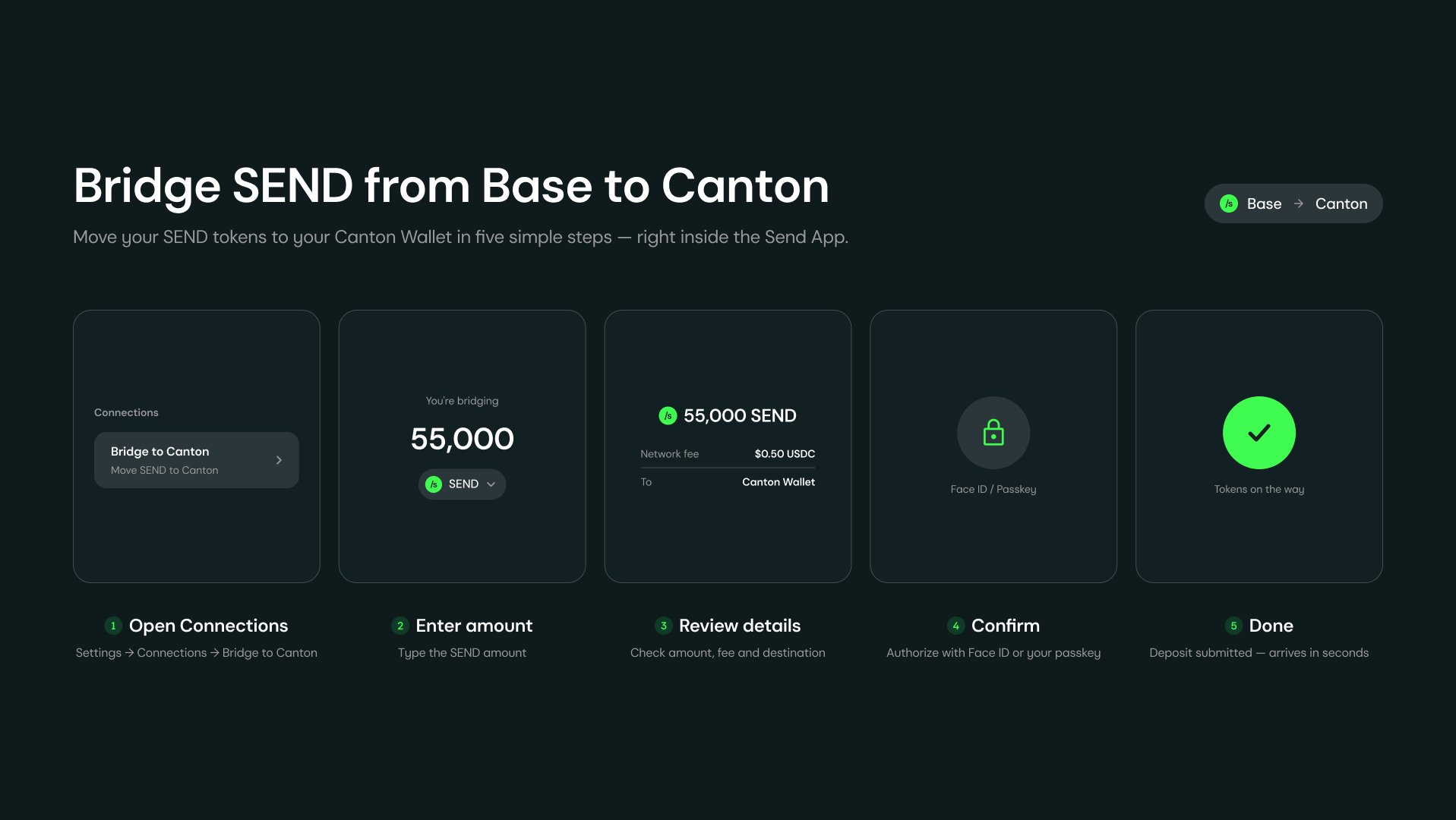
Step 1: Open Your Send App
- Open your Send App
- Tap on your profile picture in the top left corner
Step 2: Access Settings
- Tap "Settings" tab (scroll down to see the settings options)
Step 3: Go to Connections
- Under Features, tap "Connections"
Step 4: Select Bridge to Canton
- You'll see two options:
- Canton Wallet — Connect your Canton Wallet
- Bridge to Canton — Move SEND from Base to Canton
- Tap "Bridge to Canton" (Move SEND from Base to Canton)
Step 5: Enter Bridge Amount
- On the "Bridge to Canton" page, enter the amount of SEND you want to bridge
- Your available balance is shown below
- Tap "MAX" to bridge your entire balance
- The Destination shows your Canton Wallet address
Step 6: Review Bridge Details
- Tap "Review"
- On the "Review bridge" page, verify:
- You bridge — Amount of SEND being sent (e.g., 200,000 SEND)
- You receive — Amount of SEND on Canton (e.g., 200,000 SEND on Canton)
- Network fee — Transaction fee in USDC (e.g., 0.02 USDC)
- Destination — Your Canton Wallet address
Step 7: Confirm and Sign
- Tap "CONFIRM"
- The button will show "BRIDGING..." while processing
- Your device will prompt you to sign the transaction with your passkey
- Complete the passkey authentication
Step 8: Bridge Complete
- You'll see the "Bridge status" page with "Deposit submitted"
- The message confirms: "200,000 SEND is on its way to Canton."
- Options available:
- View on Base > Check the transaction on Base network
- CHECK BRIDGE AGREEMENT > Verify your bridge agreement status
- Done > Return to the app
- Tap "Done" to finish
Your bridged SEND tokens will appear in your Canton Wallet within seconds.
Get Started
Create a Send App account: Click here.
Create a Send on Canton Network Account: Click here.
FAQs
Q: What is bridging?
A: Bridging transfers your tokens from one blockchain network (Base) to another (Canton Network) while maintaining the same value.
Q: Do I need to set up the Bridge Agreement every time?
A: No. The Bridge User Agreement is a one-time setup. Once approved, you can bridge SEND anytime.
Q: What fees are involved?
A: Bridging requires a small network fee paid in USDC (e.g., 0.02 USDC). Make sure you have USDC in your Send App before bridging.
Q: How long does bridging take?
A: Bridged SEND tokens typically arrive in your Canton Wallet within seconds after the transaction is confirmed.
Q: Why do I need USDC for bridging?
A: USDC is used to pay the network transaction fee on the Base network.
Q: Can I bridge other tokens besides SEND?
A: The bridge currently supports SEND, USDC, and other authorized tokens. Check the Bridge page in your Canton Wallet for available assets.
Q: What if my Bridge Agreement is not approved?
A: Bridge Agreement approval typically takes a few minutes. If it takes longer, try tapping "Check Status" to refresh, or contact support.